
How to Get Court Records
Look first at whatever paper started your search. A notice, citation, caption, or earlier entry will name the court. That division decides where the file lives. For online case information, Miami County CourtView/eServices covers selected Common Pleas and Municipal matters. Probate runs its own case-search route plus a weekly docket. Neither display promises every filing or attachment. Protected cases stay off the screen.
An official copy comes only from the record keeper. The Miami County Clerk of Courts holds Common Pleas and Municipal files. Probate and Juvenile use separate court-office channels. Name the court, the case number if you have it, the party name exactly as written, an approximate date, and the document you want. Those details get better results than broad personal information.
- Identify the division: Common Pleas, Municipal civil, Municipal traffic/criminal, Probate, or Juvenile.
- Check the official online channel for the case number and a visible docket entry when remote access is available.
- Ask the proper clerk or court office for the requested copy, by phone or at the counter, and confirm its current request method.
- For Municipal non-Clerk records, follow the court's public-record policy and its in-person form requirement.
- Confirm the copy type and current charge before prepaying or arranging pickup, mail, fax preference, or another office-approved delivery method.
Note: A portal result only locates the case. A certified or file-stamped copy must come from the office holding the original file.
Miami County Court Record Channels
Miami County divisions do not share one file system. That is why several access routes exist. CourtView shows selected public Common Pleas and Municipal information, and the Clerk describes the online service as a convenience that may omit filed documents. When an image is missing or a result needs verification, go through the office that holds the file.
| Record need | First channel | Official follow-up |
|---|---|---|
| Common Pleas case or filed entry | CourtView/eServices | Common Pleas Clerk |
| Municipal civil, criminal, or traffic case | CourtView/eServices | Municipal Clerk counter |
| Probate case or setting | Probate case search or weekly docket | Probate Court office |
| Juvenile matter | No general public search documented | Juvenile Court authorized channel |
The Clerk of Courts directory lists each office and its role. Call ahead when you are unsure of the document type. That call matters most for anything sealed, redacted, direct-access only, or held by a court administrator.
Types of Court Records
A docket and a court file are not the same thing. The docket lists case events in order. A file can also hold pleadings, orders, exhibits, correspondence, or a transcript request the remote display never shows. Some Miami County divisions also keep court-administration public records apart from filed court documents.
- Case-information displays and docket entries for eligible public Common Pleas or Municipal matters.
- File-stamped pleadings, judgment entries, and divorce decrees held through the Common Pleas Clerk.
- Municipal civil, traffic, and criminal court files maintained by the Municipal Clerk.
- Probate estate, guardianship, name-change, and other Probate records through that division.
- Administrative records, which can follow the Court Administrator's public-record policy rather than a Clerk file route.
Transcripts sit in their own category. Under the Common Pleas policy, court-reporter pricing is set by court order, not treated as an ordinary photocopy.
Miami County Clerk Court Record Custody
Miami County is one of the Ohio counties with an elected Clerk. That Clerk keeps official records for both Common Pleas and the Municipal Court. Filing, docketing, indexing, and preserving pleadings all run through that office. The unified setup does not merge the counters. A felony, domestic-relations, or Common Pleas civil file stays on the Common Pleas path. Municipal traffic and misdemeanor cases go the Municipal route. Small-claims and municipal civil matters do too.
Miami County Clerk of Courts
Safety Building, third floor
201 W. Main St.
Troy, OH 45373
(937) 440-6010
The Municipal traffic and criminal clerk sits on the third floor of the Old Courthouse at 215 W. Main Street. The municipal civil clerk is on the second floor. For locations, trust the current directory rather than an older form header.
The Common Pleas public-records policy sends file-stamped pleadings, divorce decrees, and judgment entries to the Clerk. Court-administration records answer to a different custodian. That split matters before any request goes out. The policy draws a clear line between an administrative request and a filed court document.
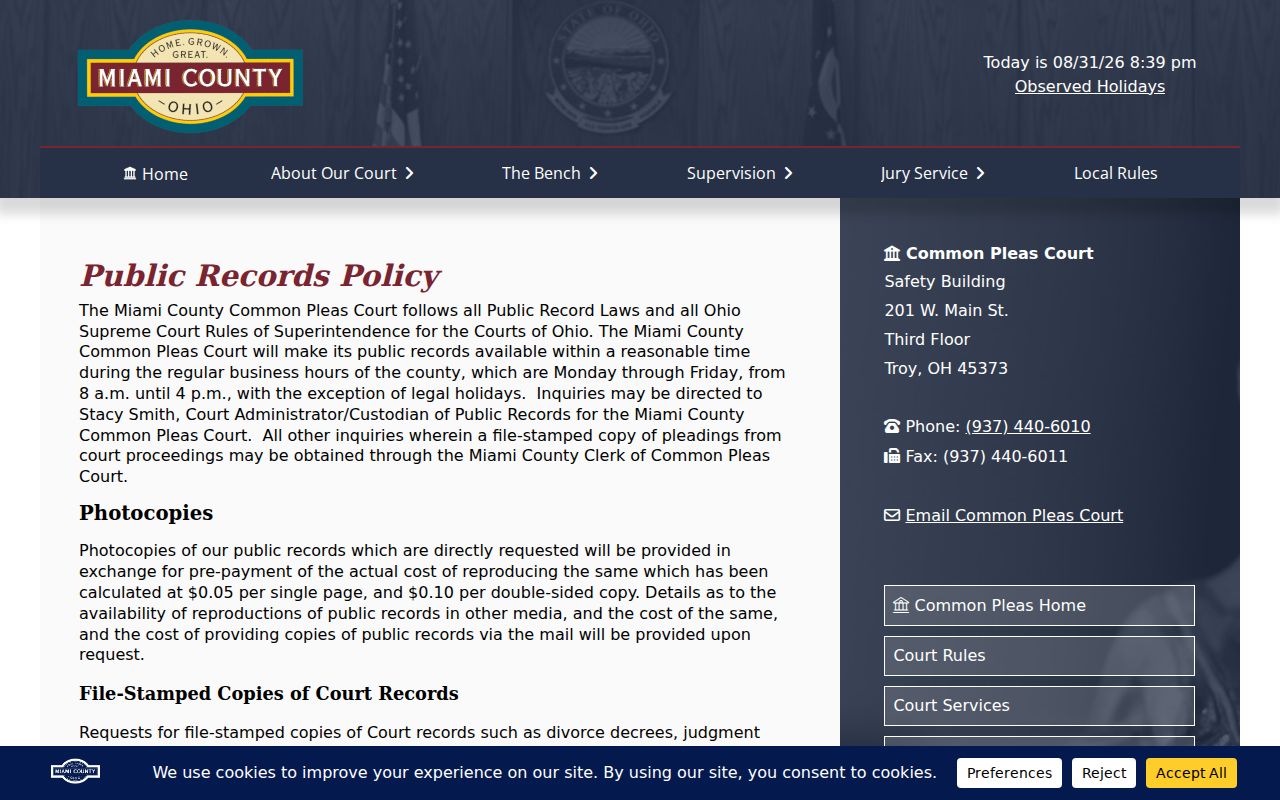
The local routing rule is simple. Court-file copies go to the Clerk, even when another office keeps an administrative record.
What a Court Record Contains
What a public record shows depends on the division. A Probate calendar lists only Case Number, Case Title, and Date & Time. Other fields may be limited by the court, the interface, or access rules. So do not assume a portal carries every image. Do not assume one layout fits all divisions.
| Case number | The court-assigned identifier. Copy it exactly from the notice, citation, or result rather than inventing a format. |
|---|---|
| Caption or case title | The formal case name, which Probate visibly labels as Case Title on its weekly docket. |
| Docket entries | Dated filings, events, orders, settings, and disposition information when released. |
| Filed document | A pleading, order, decree, or judgment entry requested from the office that maintains the file. |
| Calendar item | A scheduled date and time. It is not proof of a complete case file or a final appearance instruction. |
Verify a current setting with the court itself. A past date never tells you the next one. The county warns that its online service may be incomplete or down during outages.
Miami County Municipal Record Requests
Miami County Municipal Court handles its own records policy in a way that trips up first-time requesters. The public-record instructions place the Court Administrator in charge of any record the County Clerk does not already keep. That split matters. Send your request to the wrong office and it will simply bounce back. The request form itself must be handed in person, during weekday office hours. It offers pickup, mail, and fax boxes for delivery. Those boxes do not change the submission rule, though. You still walk it in.
Fill out the request date, a needed-by date, and your contact details. Add a case or ticket number when one applies. Describe the document plainly. The form also has spots for a birth date and the last four digits of a Social Security number. Give the office only what it truly needs. A case number, the court, a party name from the case paper, an approximate date, and the document name usually do the job.
One address warning is worth the trip. The current court directory puts the Municipal Court at 215 W. Main Street. An older form still prints 201 W. Main Street. Trust the live directory and the clerk's own instruction before you drive over or file anything. The Municipal request page spells out the current records-policy channel for anything outside the Clerk's files, and it shows no general email-submission option. Assume none exists until the court says otherwise.
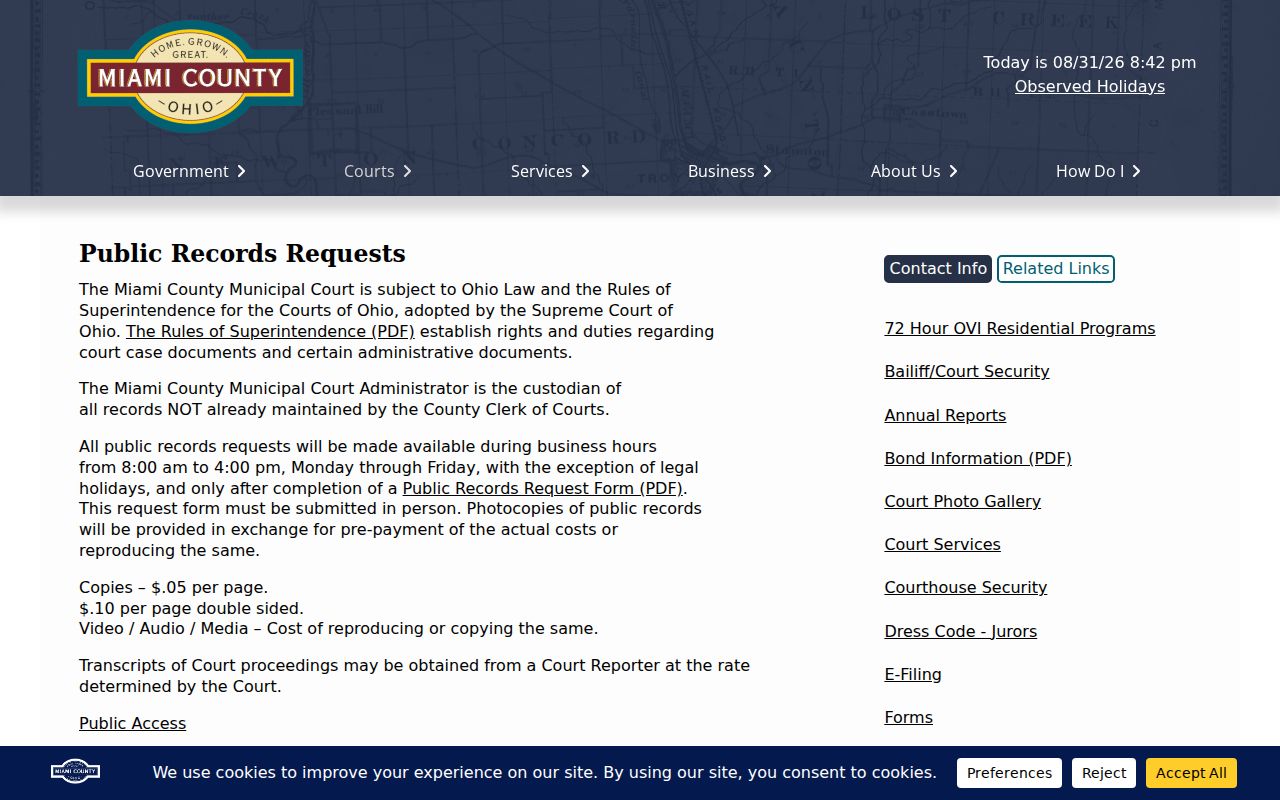
Remember: the court's administrative records policy stands apart from the Clerk-held court file.
Certified Copies and Fees
Know which product you need before you order. An ordinary copy, a certified copy, an authenticated copy, and a file-stamped copy are four different things. Probate publishes a fee schedule that prices certified and authenticated copies separately. The Common Pleas public-records policy lists its own administrative photocopy rates. Municipal's request form states Municipal's fees. One division's price never carries into another. Check the right table for your court records.
| Office or product | Published amount | Important limit |
|---|---|---|
| Common Pleas administrative single-sided copy | $0.05 per page | Policy rate for administration-held records, prepaid. |
| Common Pleas administrative double-sided copy | $0.10 per page | Mail or media cost is supplied on request. |
| Municipal form ordinary copy | $0.05 per page | Form states advance payment and no personal checks. |
| Municipal form certified copy | $2.00 per page | Confirm current price because the form has an older revision date. |
| Probate certified copy | $1 plus $0.05 per side | Different from an authenticated copy. |
| Probate authenticated copy | $28 plus $1 per page | Confirm the product needed before ordering. |
Current Probate charges live in the Probate fee schedule. A court reporter's transcript is priced separately by court order, not by that copy table.
Miami County Probate Record Choices
Probate is its own road for estates, guardianships, adoptions, civil commitments, name changes, and marriage matters. Its case-search landing page and its Weekly Probate Court Docket can help. But neither replaces the office record. The weekly display is a handy date check. It lists Case Number, Case Title, and Date & Time. It openly omits Mental Illness and Adoption matters.
Genealogy material, certified copies, and files absent from the weekly list all go through Probate's official record channel. A calendar line never means every filing is online. And a missing line may just reflect the stated confidentiality exclusion. That does not mean the case fails to exist.
Note: Probate keeps its own schedule and fee structure. So a Clerk quote for a Common Pleas or Municipal record is not a Probate quote. The division's published fee resource lays out its certified and authenticated copy options.
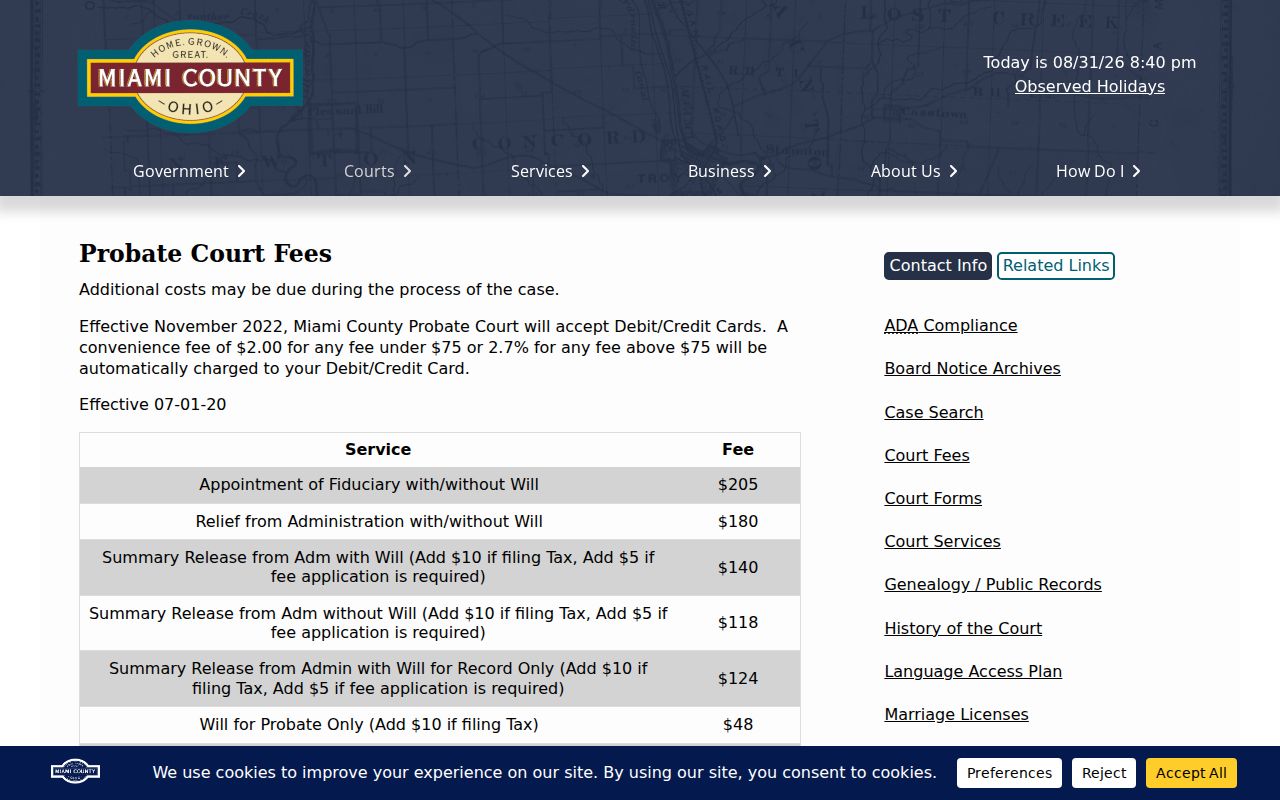
That fee schedule applies to Probate alone. Confirm the product and the total with Probate before ordering.
Miami County Court Transcript Requests
A transcript is the court reporter's own record of what happened in the proceeding. It is not a printed docket or a clerk copy. The Common Pleas public-records policy sends transcript requests to a court reporter. The rate is set by a court order. Municipal policy draws the same line. Ask the Clerk for a judgment entry and you may still not get the hearing transcript. Ask an administrator for a filed decree and you may get sent back to the Clerk.
When you contact an office, state the hearing date. Name the court division, the case number, and the proceeding you need. Miami County posts no universal transcript price, no online order system, and no email-delivery promise. Confirm the court's current directions rather than guessing at cost or turnaround.
Public Access and Sealed Records
Ohio court records start from a presumption of public access. Remote display and direct inspection are still not the same thing. Miami County's CourtView conditions say the service shows only selected public information. It does not necessarily show every filed document. So a missing online entry proves nothing about whether a record exists. A direct-access inquiry to the clerk may be the right move. That holds unless the record is sealed, confidential, or otherwise restricted.
Key Ohio access rules:
Rules of Superintendence 44 and 45 define court-record access and presume public access while allowing tailored restrictions.
Ohio Revised Code 149.43 supplies the public-record inspection and copy framework for public-office records, subject to exemptions.
Ohio Revised Code 2953.32 governs the application process for eligible adult sealing and expungement matters.
Ohio Revised Code 2151.356 is the more specific statutory layer for certain juvenile sealing and expungement questions.
Miami County Court Record Redaction
Restricted access comes in more than one shape. A court may redact a personal identifier. It may limit a document to direct access, seal a file by order, or keep a protected category off a public calendar. Probate's weekly docket says plainly that adoption and mental-illness matters are left out. Juvenile case material follows a narrower public-access path than ordinary adult records.
Bring a case-specific question to the official office. Do not run variant-name searches. Do not use automation, or a second source, to work around an access line. CourtView's terms forbid bulk downloading, mining, direct parsing, and bypassing normal controls. A failed online search means only one thing: no publicly displayed result came back. It says nothing about a person's court history.
Miami County Direct Court Record Access
For in-person access to a Miami County court record, start with the right office. Common Pleas makes public records available within a reasonable time on weekdays, legal holidays excepted. Its Clerk sits on the third floor of the Safety Building at 201 W. Main Street in Troy. The Municipal Court splits its counters between traffic and criminal on one floor and civil on another, all inside the Old Courthouse at 215 W. Main Street. Probate and Juvenile keep separate offices at 201 W. Main Street.
Public terminals, certified-copy orders by email, and other delivery options vary from office to office. Call ahead if you need a workstation, an accommodation, or direct inspection of a file. Bring the case number and other identifying details so staff can find the docket fast. And leave extra time for courthouse security screening.
Miami County Court Record Verification
Before you rely on anything from a public display, confirm the details with the office that keeps the record. Check the court, case number, date, and document type. Miami County's own portal warns that online case information can be incomplete or briefly unavailable. When a question needs an official answer, go to the Clerk's file, the Probate record, or an authorized Juvenile channel.
This check matters most when a docket entry seems to be missing. Some cases fall under a protected category, a sealed order, a redaction, or a direct-only access rule. Any of those can limit what appears remotely. A missing entry on a screen is not proof the record lacks it. Ask the court office directly rather than assume.